 English
 پارسی


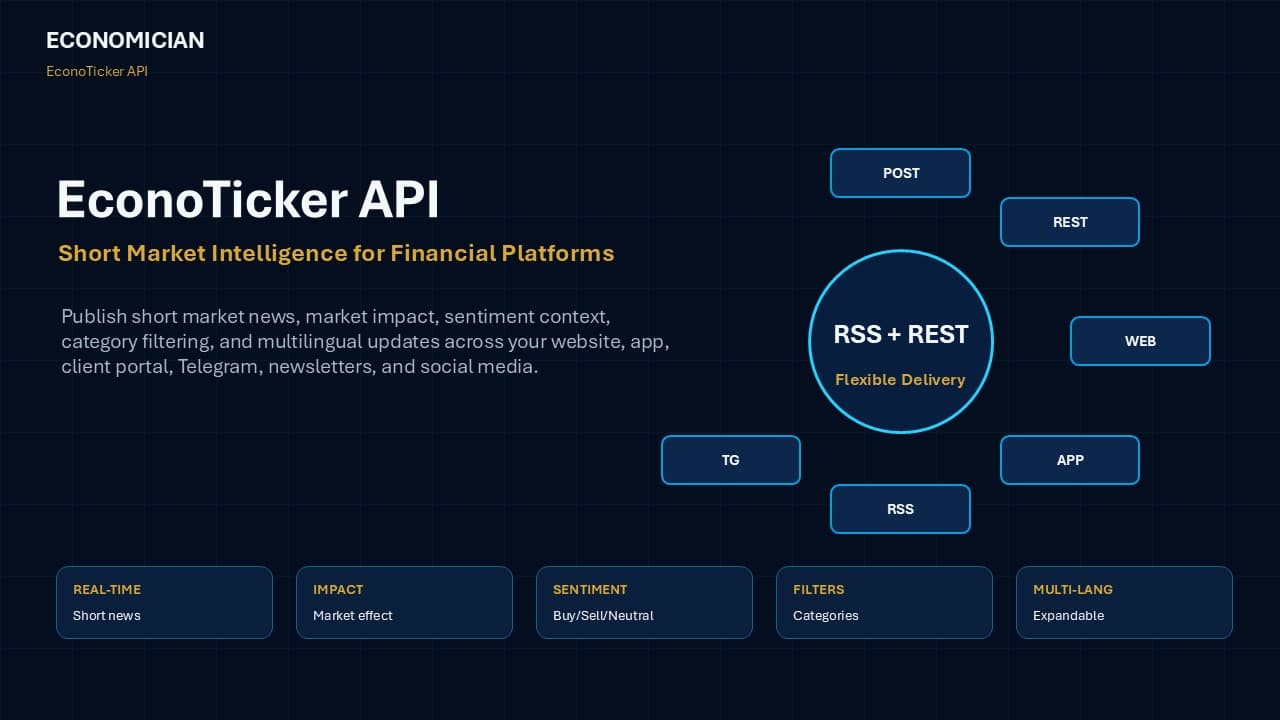
EconoTicker API: A Ready-to-Publish Market Intelligence Feed for Financial Platforms
Financial markets move fast. Traders, investors, brokers, fintech platforms, prop firms, trading communities, and financial media companies need timely information, but they do not always need long reports, complicated dashboards, or overloaded news feeds. They need a fast, clear, structured market context that explains what happened, why it matters, which markets may be affected, and how the information can be used across digital channels.
That is exactly what the EconoTicker API is designed to provide.
EconoTicker API is a short market intelligence feed built for broker websites, trading platforms, fintech applications, client portals, Telegram channels, newsletters, mobile apps, financial media, and social platforms. It turns important market events into compact, structured, publish-ready updates with market impact, sentiment context, source attribution, category filtering, multilingual delivery, and flexible technical integration.
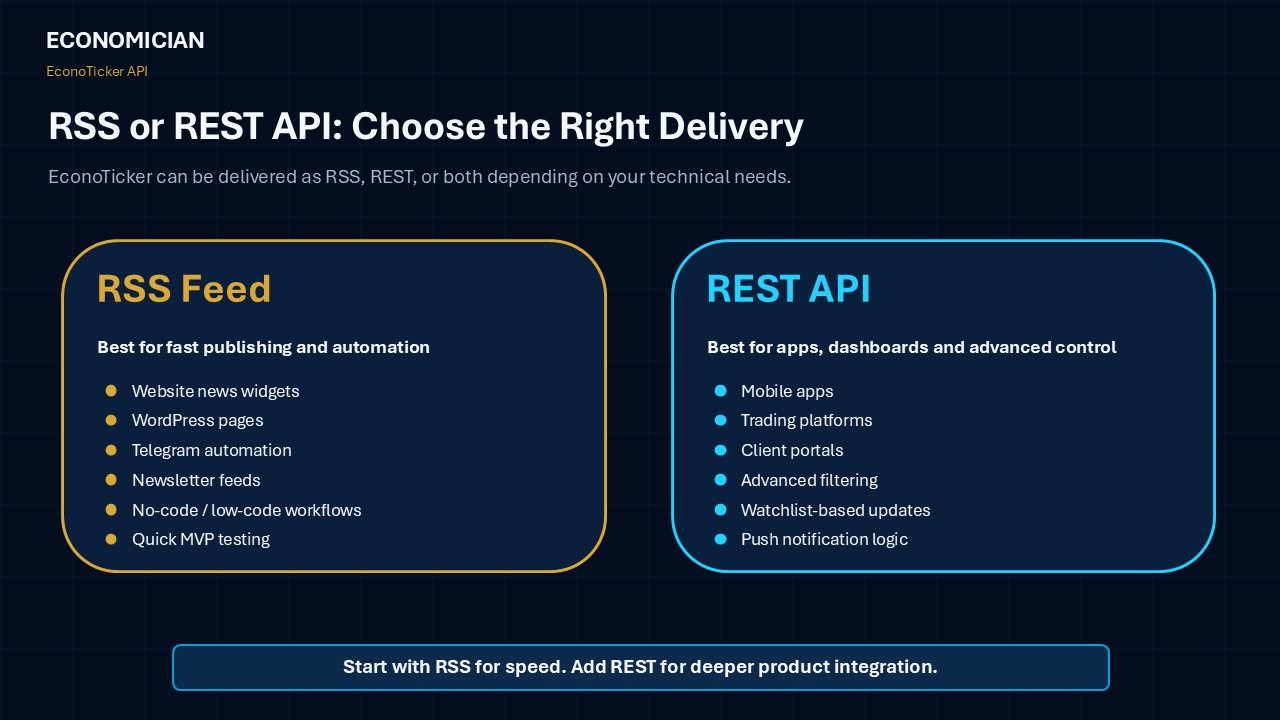
Depending on the client’s needs, EconoTicker can be delivered through RSS feed, REST API, or both.
For companies that want simple publishing, automation, and fast setup, RSS is usually the best starting point. For companies that need deeper filtering, application-level control, custom queries, dashboards, app integration, or more advanced product logic, the REST API is usually the better option.
In both cases, EconoTicker helps financial platforms publish useful market intelligence without having to build a full newsroom, translation workflow, analyst desk, or custom content operation from scratch.
What Is EconoTicker API?
EconoTicker API is a financial short-news and market intelligence service designed to deliver concise market updates in structured technical formats. It helps platforms publish short financial news, economic data reactions, market impact explanations, sentiment labels, source attribution, category tags, and multilingual content.
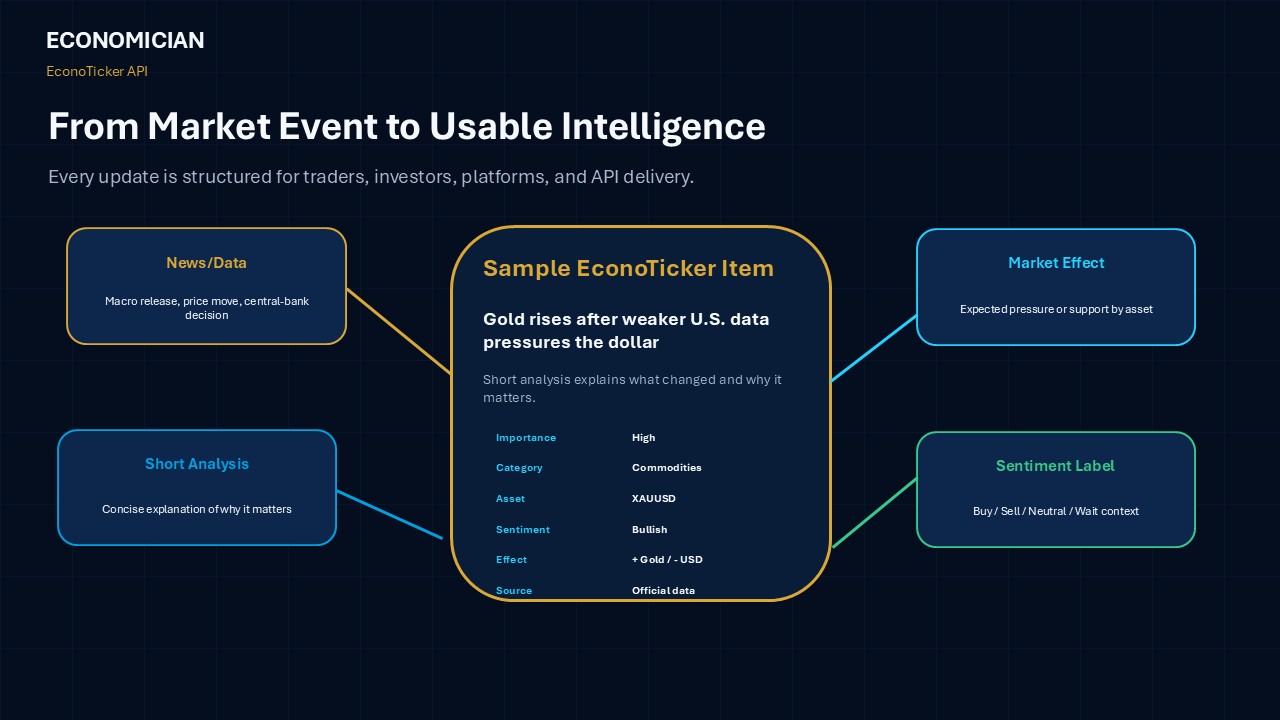
Each EconoTicker item can include:
- Short financial news
- Economic data reaction
- Market impact explanation
- Market sentiment label
- Related asset, currency, or market
- Importance level
- Category and subcategory
- Source attribution
- Timestamp
- Language option
- RSS-ready or REST-ready structure
The service is designed for companies that want to give users fast, useful market context without forcing them to read long articles or leave the platform.
Why Financial Platforms Need Short Market Intelligence
The financial content problem is simple: there is too much information, but not enough useful context.
Traders often see headlines, economic releases, central bank comments, geopolitical updates, and price movements, but they still need fast answers to practical questions:
- What happened?
- Why does it matter?
- Which market may be affected?
- Is the impact bullish, bearish, or neutral?
- Which asset, currency, index, commodity, or crypto market should users watch?
- Is this data important enough to affect trading sentiment?
For brokers and fintech platforms, the problem is also commercial. They need fresh content to keep users active, but creating content internally requires writers, analysts, editors, translators, developers, compliance review, and publishing tools.
EconoTicker solves this by offering a ready-to-publish market intelligence layer.
The Main Problems EconoTicker Solves
1. Information Overload
Most financial news feeds deliver too many headlines. EconoTicker focuses on short, direct updates that quickly explain market relevance.
Instead of giving users another long stream of headlines, EconoTicker turns market events into concise and structured intelligence.
2. Slow Reaction to Market Events
Macro data, central bank decisions, inflation reports, employment numbers, oil inventories, geopolitical risks, and major market moves can affect sentiment quickly.
EconoTicker is designed to help platforms react faster by delivering compact market updates that are ready for publication.
3. Low User Engagement
Static websites and client portals often fail to bring users back. Short market updates, impact labels, and signal-oriented content can help create more reasons for users to return during active market hours and volatility.
4. High Content Cost
A professional market content operation may require a full editorial and technical workflow. EconoTicker gives platforms a more cost-efficient alternative by providing structured market intelligence that can be published across multiple channels.
What the EconoTicker API Provides
EconoTicker is not only a basic news feed. It is a structured market-content system designed for distribution, filtering, integration, and engagement.
Short Financial News
EconoTicker delivers compact market updates written for traders and investors. Each item is designed to be clear, fast to read, and suitable for digital publishing.
Example topics include:
- Market-moving economic data
- Central bank decisions
- Inflation reports
- Employment data
- GDP releases
- PMI reports
- Currency movements
- Gold and oil updates
- Crypto market moves
- Stock index reactions
- Bond market developments
- Geopolitical risk events
- Political and sanctions-related market risk
Economic Data Reactions
EconoTicker can cover major economic indicators such as:
- CPI
- PPI
- PCE inflation
- NFP
- Unemployment rate
- GDP
- Retail sales
- PMI
- ISM data
- Consumer confidence
- Industrial production
- Trade data
- Central bank decisions
- Interest rate expectations
The goal is not only to report the number. The goal is to explain whether the data supports or pressures the relevant currency, commodity, equity index, crypto asset, bond market, or risk sentiment.
Market Impact Labels
Each update can include a market effect section explaining which assets may be affected and why.
Examples:
- Supportive for USD
- Negative for gold
- Neutral for equities
- Bullish for oil
- Bearish for risk assets
- Supportive for yields
- Mixed for crypto sentiment
This helps users understand the possible market relevance quickly.
Market Sentiment Context
EconoTicker can include simple sentiment labels such as:
- Buy
- Sell
- Neutral
- Wait
These labels are designed as market-context indicators, not personalized investment advice. They help platforms communicate market direction simply and consistently.
Source Attribution
Each update can include a source line, helping platforms show where the original information came from, such as official data, central bank releases, economic calendars, or market sources.
Multilingual Delivery
EconoTicker is designed for multilingual expansion.
Available now:
- English
- Persian
Planned or expandable language options:
- Spanish
- Arabic
- Turkish
- Russian
- Hindi
- Other languages based on client demand
Covered Markets and Categories
EconoTicker uses structured categories so clients can filter and publish only the content that matters to their audience.
Regional Coverage
Platforms can use regional categories to create localized market sections, homepage widgets, alerts, or country-specific feeds.
Regional coverage can include:
- USA
- Europe
- UK
- China
- Japan
- Canada
- Russia
- Oceania
- India
- Iran
- Other regions based on client needs
Market and Theme Coverage
EconoTicker also supports asset and theme-based categories, including:
- Forex
- Commodities
- Cryptocurrencies
- Equities
- Geopolitics
- Day Trade Signals
This category structure helps platforms avoid a mixed feed and instead route relevant content to the right users.
Why Category Filtering Creates Product Value
Category filtering is one of the strongest advantages of the EconoTicker API. It turns short news into usable market data.
- Cleaner Data Segmentation
Clients can filter content by asset class, region, country, or theme. For example, a broker can show Forex news to currency traders, crypto updates to crypto users, and commodity news to gold or oil traders.
- Better User Engagement
Users do not need to scroll through irrelevant content. They can follow the topics that matter most to them, such as Forex, Crypto, Commodities, USA, Europe, Japan, or Day Trade Signals.
- More Relevant Trading Context
Day Trade Signals and asset-specific categories help platforms deliver content to users who already follow those markets.
- Flexible API Packages
Partners can start with selected categories and later expand into more regions, markets, languages, or delivery channels.
- Stronger Analytics
Platforms can measure which categories generate the most engagement, clicks, opens, alert demand, and user activity.
What Makes EconoTicker Different?
Most financial news feeds report what happened. EconoTicker focuses on what the event means for traders and investors.
A typical financial news or data feed may include:
- Headline
- Timestamp
- Basic economic figure
- Generic category
- Limited market explanation
- Short analysis
- Possible market effect
- Sentiment label
- Affected asset or currency
- Source attribution
- Category filtering
- Multilingual delivery
- RSS and REST delivery options
This makes each update more useful for brokers, fintech apps, trading platforms, client portals, and financial media.
More Than News: Direct Market Context for Traders and Investors
EconoTicker is designed to be useful, not just informative.
Each update aims to answer practical questions such as:
- What happened?
- Why does it matter?
- Which market is affected?
- Is the impact bullish, bearish, or neutral?
- Which asset, currency, index, commodity, or crypto market should users watch?
- Is the data important or low impact?
- What should traders and investors understand quickly?
This makes the feed more valuable than a headline-only news stream.
RSS and/or REST API Delivery: Choose the Best Format for Your Platform
EconoTicker can provide the service in RSS, REST, or both, depending on the client’s request.
This matters because different platforms have different technical needs. Some clients want a simple feed they can publish quickly. Others need a more flexible API that can power apps, dashboards, client portals, and custom search or filtering logic.
What Is RSS Delivery?
RSS is a standardized feed format, usually delivered in XML. It is widely supported by websites, CMS platforms, automation tools, Telegram bots, newsletter tools, and content aggregators.
RSS is ideal when the main goal is to publish or distribute market updates quickly.
RSS Is Best For:
- Website news widgets
- WordPress websites
- Broker market news pages
- Telegram automation
- Newsletter automation
- Content syndication
- Simple client portal feeds
- No-code or low-code workflows
- Fast MVP testing
- Teams that want easy integration
Why Choose RSS?
RSS is simple, stable, and widely supported. Many platforms can read RSS feeds without heavy custom development.
For example, a broker can connect an RSS feed to a website widget, a Telegram bot, or a newsletter workflow and start publishing market updates quickly.
RSS is usually the fastest option for clients who want to display EconoTicker content without building a complex application layer.
What Is REST API Delivery?
REST API delivery is usually based on HTTP requests and structured responses, often in JSON format. It gives developers more control over how content is requested, filtered, processed, cached, and displayed.
REST API is ideal when the platform needs dynamic content, deeper filtering, custom queries, user-specific feeds, or integration into apps and dashboards.
REST API Is Best For:
- Mobile apps
- Trading platforms
- Client portals
- Custom dashboards
- Advanced search and filtering
- App-level content personalization
- Watchlist-based news
- Asset-specific news sections
- Internal systems
- Push notification engines
- Advanced analytics
- Developer-controlled integrations
Why Choose REST?
REST gives more technical flexibility. A platform can request only the content it needs, filter by category, language, asset, region, importance, timestamp, or market sentiment, and display the content in a custom user interface.
For example, a trading app may request only high-importance gold and oil updates, while a client portal may show Forex and macro news in English and Persian.
REST is usually the better option for teams that want more control, more structured filtering, and deeper product integration.
RSS vs REST: Which One Should You Choose?
The best choice depends on your technical goals.
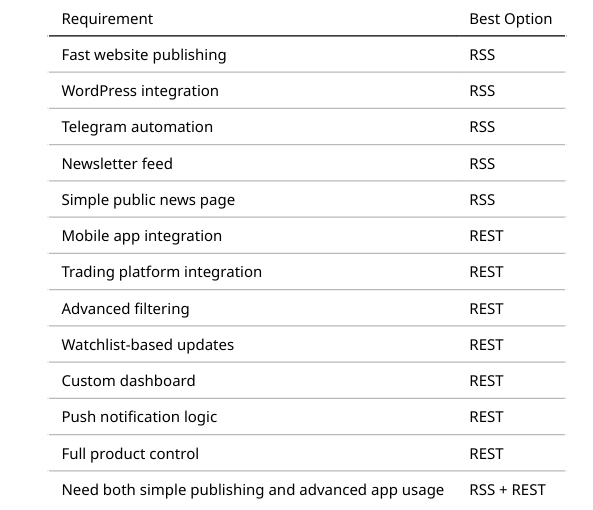
In simple terms:
RSS is best for fast publishing and automation.
REST is best for custom applications and advanced control.
Many clients may start with RSS for fast testing and later add REST for deeper integration.
Example RSS Feed Structure
A standard EconoTicker RSS feed may include fields such as title, link, description, publication date, category, and unique ID.
<rss version="2.0">
<channel>
<title>EconoTicker Market Intelligence Feed</title>
<link>https://economician.com/econoticker</link>
<description>Short market intelligence, sentiment labels, and market impact updates.</description>
<language>en</language>
<item>
<title>Gold rises after weaker U.S. data pressures the dollar</title>
<link>https://economician.com/econoticker/gold-rises-us-data</link>
<description>
Gold moved higher as softer U.S. economic data reduced dollar strength and supported demand for defensive assets.
</description>
<pubDate>Mon, 24 Jun 2026 10:30:00 GMT</pubDate>
<category>Commodities</category>
<guid>econoticker-20260624-xauusd-001</guid>
</item>
</channel>
</rss>
Example Extended RSS Fields
For more advanced RSS delivery, EconoTicker can include custom metadata fields.
<econoticker:importance>High</econoticker:importance>
<econoticker:asset>XAUUSD</econoticker:asset>
<econoticker:marketEffect>Positive for gold, softer for USD</econoticker:marketEffect>
<econoticker:sentiment>Bullish for gold</econoticker:sentiment>
<econoticker:source>Official data / market sources</econoticker:source>
<econoticker:language>English</econoticker:language>
These fields help platforms filter, route, display, and analyze market content more effectively.
Example REST API Response
A REST API response may be delivered in JSON format.
{
"id": "econoticker-20260624-xauusd-001",
"title": "Gold rises after weaker U.S. data pressures the dollar",
"category": "Commodities",
"asset": "XAUUSD",
"importance": "High",
"language": "en",
"published_at": "2026-06-24T10:30:00Z",
"summary": "Gold moved higher as softer U.S. economic data reduced dollar strength and supported demand for defensive assets.",
"market_effect": "Positive for gold, softer for USD",
"sentiment": "Bullish for gold",
"source": "Official data / market sources",
"url": "https://economician.com/econoticker/gold-rises-us-data"
}
This structure is useful for mobile apps, dashboards, client portals, trading platforms, and advanced filtering systems.
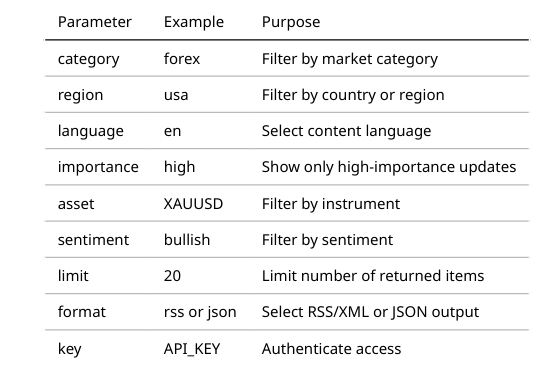
Suggested RSS and REST Parameters
EconoTicker can support simple query parameters to make filtering easier.
- Example REST request:
https://api.economician.com/econoticker/v1/news?category=commodities&language=en&limit=20
- Example crypto feed:
https://api.economician.com/econoticker/v1/news?category=crypto&language=en&limit=10
- Example Persian Forex feed:
https://api.economician.com/econoticker/v1/news?category=forex&language=fa&limit=10
Integration Options for Developers
EconoTicker can be integrated using standard development workflows.
JavaScript / Node.js RSS Example
import Parser from "rss-parser";
const parser = new Parser();
async function loadEconoTicker() {
const feed = await parser.parseURL(
"https://api.economician.com/econoticker/rss?category=forex&language=en&key=YOUR_API_KEY"
);
feed.items.forEach(item => {
console.log(item.title);
console.log(item.contentSnippet);
console.log(item.pubDate);
});
}
loadEconoTicker();
JavaScript / Node.js REST Example
async function loadEconoTickerNews() {
const response = await fetch(
"https://api.economician.com/econoticker/v1/news?category=forex&language=en&limit=10",
{
headers: {
"Authorization": "Bearer YOUR_API_KEY"
}
}
);
const data = await response.json();
data.items.forEach(item => {
console.log(item.title);
console.log(item.market_effect);
console.log(item.sentiment);
});
}
loadEconoTickerNews();
PHP RSS Example
$feedUrl = "https://api.economician.com/econoticker/rss?category=commodities&language=en&key=YOUR_API_KEY";
$xml = simplexml_load_file($feedUrl);
foreach ($xml->channel->item as $item) {
echo "<h3>" . $item->title . "</h3>";
echo "<p>" . $item->description . "</p>";
echo "<small>" . $item->pubDate . "</small>";
}
PHP REST Example
$apiUrl = "https://api.economician.com/econoticker/v1/news?category=commodities&language=en&limit=10";
$options = [
"http" => [
"header" => "Authorization: Bearer YOUR_API_KEY"
]
];
$context = stream_context_create($options);
$response = file_get_contents($apiUrl, false, $context);
$data = json_decode($response, true);
foreach ($data["items"] as $item) {
echo "<h3>" . $item["title"] . "</h3>";
echo "<p>" . $item["summary"] . "</p>";
echo "<strong>" . $item["sentiment"] . "</strong>";
}
Python RSS Example
import feedparser
feed_url = "https://api.economician.com/econoticker/rss?category=crypto&language=en&key=YOUR_API_KEY"
feed = feedparser.parse(feed_url)
for item in feed.entries:
print(item.title)
print(item.summary)
print(item.published)
Python REST Example
import requests
url = "https://api.economician.com/econoticker/v1/news"
params = {
"category": "crypto",
"language": "en",
"limit": 10
}
headers = {
"Authorization": "Bearer YOUR_API_KEY"
}
response = requests.get(url, params=params, headers=headers)
data = response.json()
for item in data["items"]:
print(item["title"])
print(item["market_effect"])
print(item["sentiment"])
WordPress Integration
WordPress websites can connect to EconoTicker using RSS or REST.
- RSS-Based WordPress Integration
RSS is often the easiest option for WordPress. It can be used with:
- Native RSS blocks
- RSS feed plugins
- Custom PHP widgets
- Elementor widgets
- Shortcode-based display modules
- Custom post importers
A broker website can create separate pages for Forex, Commodities, Crypto, and Economic News using category-filtered RSS links.
- REST-Based WordPress Integration
REST is better when the website needs a custom design, advanced filtering, caching, or dynamic asset-specific pages.
For example, a broker can create:
- A Forex market news widget
- A gold and oil market update page
- A crypto market news page
- A client portal dashboard
- A multilingual short-news section
- A category-based SEO news hub
No-Code and Low-Code Automation
Non-technical teams can use no-code tools to connect the EconoTicker RSS feed to other channels.
Possible workflows include:
- RSS feed to Telegram channel
- RSS feed to email newsletter
- RSS feed to social media scheduler
- RSS feed to internal Slack or Discord channel
- RSS feed to Google Sheets
- RSS feed to website content block
REST can also be used with advanced automation platforms when custom API requests are supported.
This allows teams to start quickly without waiting for a full development cycle.
Use Cases for Brokers and Financial Platforms
- Broker Websites
Brokers can add fresh market updates to their website to improve returning traffic, support SEO, and give users a reason to check the site more often.
- Trading Platforms
Trading platforms can display short market intelligence near charts, watchlists, asset pages, or economic calendar sections.
- Client Portals
Brokers can add EconoTicker inside the logged-in client area to give traders quick market context without sending them to external websites.
- Mobile Apps
Fintech and trading apps can use EconoTicker to power market cards, push notifications, watchlist updates, and asset-specific news sections.
- Telegram Channels
Many brokers, IBs, trading communities, and financial educators use Telegram for daily communication. EconoTicker can support short updates suitable for Telegram distribution.
- Newsletters
EconoTicker content can be used to create daily, weekly, or intraday market summaries for email subscribers.
- Social Media
Short market updates can be adapted for LinkedIn, X, Telegram, Instagram captions, or community posts.
Day Trade Signals: AI-Generated, Human-Revised
EconoTicker can also include Day Trade Signals as a higher-value content layer.
These signals are not raw AI outputs. The workflow combines AI-generated market scanning with human review.
How the Signal Workflow Works
1. Signal Generation
AI models scan market structure, technical setups, momentum, and event context to create an initial trading idea.
2. Human Revision
Human analysts review the signal, check whether it makes sense, refine the wording, and remove weak or low-quality ideas.
3. Clear Signal Output
The final signal can include instrument, direction, entry area, key levels, target zone, and short rationale.
4. Practical Use Case
Signals can be used for trader engagement, watchlist alerts, broker communities, and platform content.
Important note: Day Trade Signals are informational trading ideas, not personalized investment advice, and not guaranteed outcomes.
Example of an EconoTicker Market Intelligence Item
A standard EconoTicker item may look like this:
Title:
Japan CSPI Holds Steady at 3.3%, Showing Stable Corporate Service Inflation
Short Analysis:
Japan’s Corporate Services Price Index remained unchanged in the latest annual reading, signaling stable price pressure in the corporate services sector.
Data Point:
The CSPI rose 3.3% year-on-year, matching both the 3.3% forecast and the previous 3.3% reading.
Possible Market Effect:
The market impact is likely limited because the data matched expectations. However, stable corporate services inflation may keep mild pressure on the Bank of Japan to remain cautious about inflation persistence.
Market Sentiment:
Japanese Yen: Neutral
Japan Government Bonds: Neutral
Nikkei 225: Neutral
Q&A:
Q: What was Japan’s latest CSPI reading?
A: Japan’s CSPI rose 3.3% year-on-year.
Q: Is Japan’s CSPI data inflationary?
A: It shows firm service-sector price pressure, but no fresh acceleration because the reading was unchanged.
Source:
Economic calendar data
This structure gives users more context than a basic headline.
Pricing and Language Model
EconoTicker pricing is designed to be simple, pilot-friendly, and scalable.
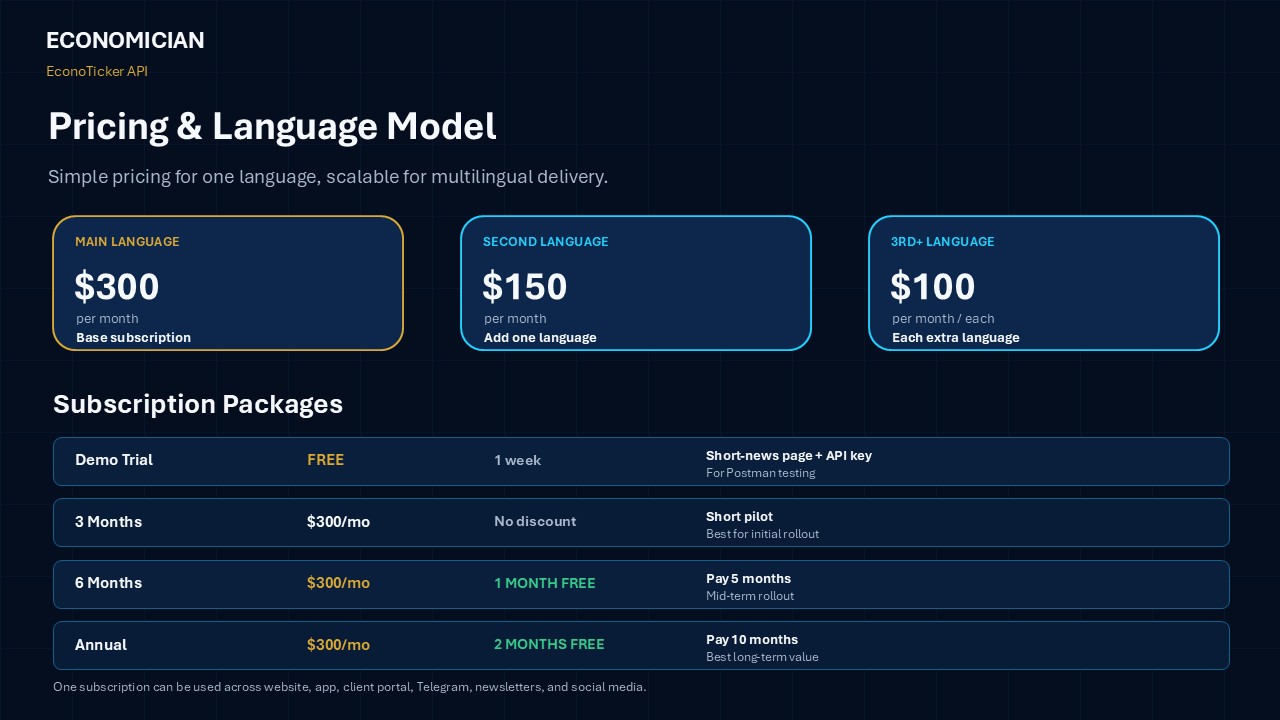
Base Language Pricing
Main language: $300 per month
Second language: $150 per month
Third language and more: $100 per month for each additional language
This structure allows platforms to start with one core language and expand into additional markets when demand grows.
For example:
- English only: $300/month
- English + Persian: $450/month
- English + Persian + Arabic: $550/month
- English + Persian + Arabic + Turkish: $650/month
Trial Access
Demo Trial: Free for 1 week
Includes:
- Short-news page demo
- API key for testing
- RSS and/or REST test endpoint
- Postman testing
- Sample categories
- Sentiment fields
- Market effect fields
- Source fields
Packages
3-Month Package
$300 per month for the main language
Best for short pilots and campaign-based testing.
No discount is included for the 3-month package.
6-Month Package
$300 per month list price for the main language
Includes 1 month free, meaning the client effectively pays for 5 months and receives 6 months of access.
Best for mid-term rollout.
Annual Package
$300 per month list price for the main language
Includes 2 months free, meaning the client effectively pays for 10 months and receives 12 months of access.
Best for long-term publishing and full platform integration.
One Subscription, Multiple Platforms
One of the main commercial advantages of EconoTicker is multi-channel usage.
With one subscription, partners can use the same market-news feed across their owned channels, including:
- Website
- Mobile app
- Client portal
- Trading platform
- Telegram channel
- Newsletter
- Email campaign
- Social media
- Push notification system
- Internal dashboard
This means clients do not need to pay separately for each platform. They can publish the same structured feed across multiple channels and create a consistent market-content experience for their audience.
How to Access EconoTicker API
The access process is simple.
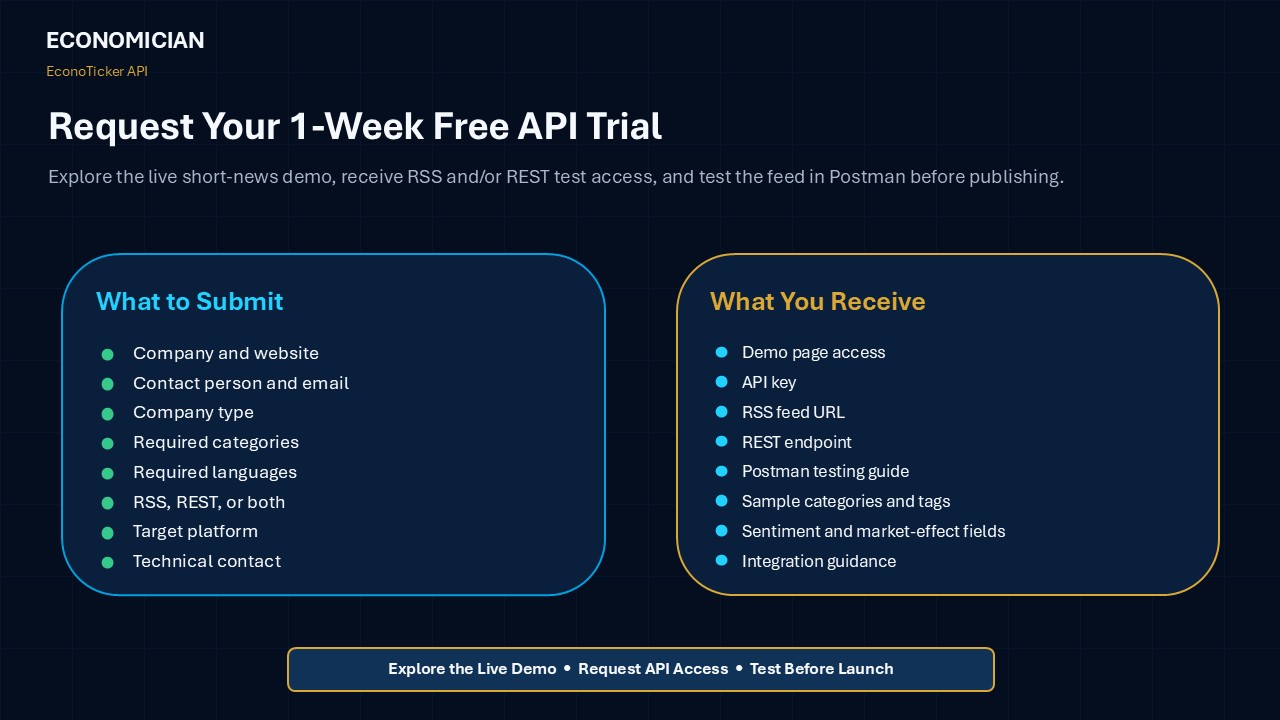
Step 1: View the Live Short-News Demo
Clients can first review the public short-news page to understand the format, writing style, market context, and content structure.
Step 2: Request One-Week API Trial
Clients can submit a request form and ask for a one-week trial access.
The request should include:
- Company name
- Website
- Contact person
- Company type
- Required categories
- Required languages
- Preferred delivery format: RSS, REST, or both
- Target platform
- Technical contact
- Package interest
Step 3: Receive Test Access
After approval, the client receives:
- RSS feed URL, REST endpoint, or both
- API key
- Postman testing instructions
- Available categories
- Sample endpoint structure
- Technical notes
Step 4: Test in Postman
The client tests the feed structure, response format, category filtering, language options, and authentication method.
Step 5: Choose Integration Channel
The client decides where the feed will be used:
- Website
- App
- Client portal
- Telegram
- Newsletter
- Social media
- Dashboard
- Trading platform
Step 6: Select a Package
The client chooses the best package based on expected usage, language needs, testing results, and rollout plan.
Step 7: Launch and Scale
After setup, the client can launch the feed and later expand by adding more categories, languages, endpoints, or delivery channels.
Compliance and Advisory Disclaimer
EconoTicker content is informational and non-advisory.
Market sentiment labels, possible market effects, and Day Trade Signals are designed as market-context tools. They are not personalized investment advice, not financial recommendations, and not guaranteed trading outcomes.
Partners should display appropriate disclaimers based on their local regulatory requirements and internal compliance policies.
Suggested disclaimer:
EconoTicker content is provided for informational and educational purposes only. It does not constitute investment advice, financial advice, trading advice, or a recommendation to buy or sell any financial instrument.
Why Choose EconoTicker API?
EconoTicker is built for companies that want to add market intelligence quickly, affordably, and flexibly.
1. Ready-to-Publish Content
Content is designed for direct use in websites, apps, dashboards, newsletters, and Telegram channels.
2. Market Context, Not Just Headlines
Each update can explain why the news matters and which markets may be affected.
3. RSS and REST Delivery
Clients can choose RSS for simple publishing, REST for advanced integration, or both for maximum flexibility.
4. Category Filtering
Platforms can deliver relevant content by country, region, asset class, market theme, or signal type.
5. Multilingual Expansion
Clients can start with one main language and add more languages as regional demand grows.
6. Lower Content Cost
Partners can add a professional market-intelligence layer without hiring a full editorial and translation team.
7. One Subscription for Multiple Channels
Clients can use the same feed across websites, apps, portals, Telegram, newsletters, and social media.
8. Easy Trial Process
The one-week free trial and Postman testing process reduce technical and commercial risk.
Who Should Use EconoTicker API?
EconoTicker is suitable for:
- Forex brokers
- CFD brokers
- Crypto platforms
- Prop trading firms
- Fintech apps
- Financial media websites
- Trading communities
- IB networks
- Financial educators
- Market research platforms
- Investment content platforms
- Telegram-based trading communities
- Broker client portals
- Economic calendar providers
It is especially useful for companies that want to improve engagement but do not want to build a full internal market news department.
Final Thoughts
EconoTicker API gives brokers, trading platforms, fintech apps, financial media, and trading communities a practical way to publish short market intelligence across multiple channels.
The service is not only about financial news. It is about turning market events into structured, readable, useful, and publish-ready intelligence.
With category filtering, multilingual support, market impact labels, sentiment context, RSS and REST delivery, flexible integration, and one-week free trial access, EconoTicker gives financial platforms a cost-efficient way to improve content, engagement, and user experience.
Request your 1-week free API trial and test the EconoTicker feed before publishing it on your platform.
How to Use/test the EconoTiker Client API in Postman
The Economician Client API allows approved clients and partners to access Economician service data directly through API requests. Using this API, clients can retrieve published news, post categories, filtered news results, and single news details from the system.
This guide explains how clients can test the API in Postman and understand the basic authentication process.
What You Need Before Starting
Before using the API, each client must receive the following access details from the Economician team:
- Site URL: The base URL of the API server.
- Client Email: The email address assigned to the client account.
- Client Password: The password assigned to the client account.
- X-API-KEY: The private API key required for accessing partner service endpoints.
For security reasons, clients must never share their real password, API key, or access token in screenshots, public documents, chats, or support tickets. When sharing examples, use placeholders such as:
YOUR_CLIENT_EMAIL
YOUR_CLIENT_PASSWORD
YOUR_CLIENT_API_KEY
YOUR_CLIENT_TOKEN
How the Authentication Works
The API uses two layers of access control:
First, the client logs in with their email and password. After successful login, the system returns a temporary Bearer token.
Second, when the client wants to request news data or categories, they must send both:
Authorization: Bearer YOUR_CLIENT_TOKEN
X-API-KEY: YOUR_CLIENT_API_KEY
This means that the API key alone is not enough, and the Bearer token alone is also not enough for partner data requests. Both are required.
Step-by-step implementation
Step 1: Open or Import the Postman Collection
Open Postman and import the API collection file provided by the Economician team.
If your team uses Postman Documenter, you can also open the published Postman documentation link directly.
The collection contains ready-made requests, so you do not need to manually create every API request from the beginning.
Step 2: Create a Postman Environment
In Postman, go to Environments and create a new environment.
You can name it something like:
Economician Client - Production
or
Economician Client - Staging
Then add the following variables:
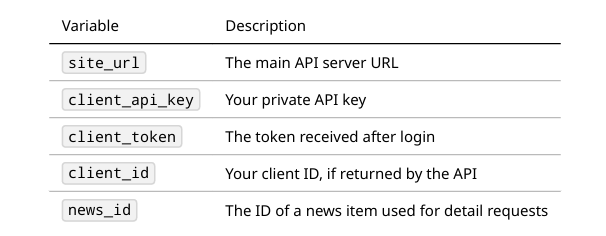
At the beginning, keep client_token empty. It will be filled after a successful login.
Step 3: Select the Environment
After creating the environment, select it from the environment dropdown in the top-right corner of Postman.
This step is important because requests use variables such as:
{{site_url}}
{{client_api_key}}
{{client_token}}
If the environment is not selected, Postman will not know what these variables mean.
Step 4: Login and Get the Client Token
Open the request named Client Login.
The login endpoint is:
POST {{site_url}}/api/short-news-api-client/auth/login
Use the following JSON body:
{
"email": "YOUR_CLIENT_EMAIL",
"password": "YOUR_CLIENT_PASSWORD"
}
Required headers:
Accept: application/json
Content-Type: application/json
Click Send.
If the credentials are correct, the API will return a successful response with a Bearer token. This token must be used in the next requests.
Example token usage:
Authorization: Bearer YOUR_CLIENT_TOKEN
Step 5: Get the News List
After login, open the request named Get News List.
The endpoint is:
GET {{site_url}}/api/partner/service/short-news?lang=en
Required headers:
Accept: application/json
Authorization: Bearer {{client_token}}
X-API-KEY: {{client_api_key}}
Click Send.
If everything is correct, the API will return a JSON response containing the list of published news.
Step 6: Get Post Categories
To retrieve available news or post categories, use the Get post-categories request.
The endpoint is:
GET {{site_url}}/api/partner/service/post-categories?lang=en
Required headers:
Accept: application/json
Authorization: Bearer {{client_token}}
X-API-KEY: {{client_api_key}}
This request returns the available categories that can be used for filtering news results.
Step 7: Get Filtered News Results
Clients can also filter news results by language, date, search keyword, category, pagination, and sorting.
Example endpoint:
GET {{site_url}}/api/partner/service/short-news?lang=en&date_from=2025-01-01&date_to=2025-02-01&search=ETF&sort=-published_at&with_content=1&per_page=10&page=1&category_id=14
Available query parameters include:
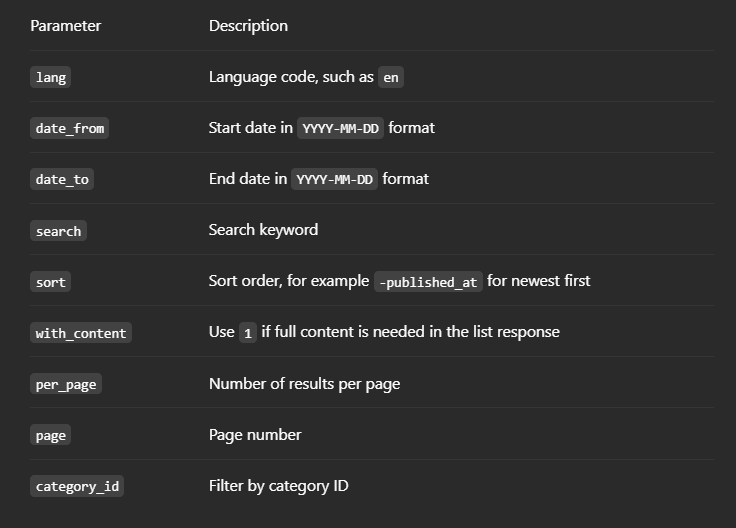
Required headers remain the same:
Accept: application/json
Authorization: Bearer {{client_token}}
X-API-KEY: {{client_api_key}}
Step 8: Get Details of a Single News Item
To get the full details of one news item, first request the news list and copy the ID of one news item.
Then use the Get News Details request.
Endpoint:
GET {{site_url}}/api/partner/news/{{news_id}}
Required headers:
Accept: application/json
Authorization: Bearer {{client_token}}
X-API-KEY: {{client_api_key}}
Replace {{news_id}} with the real ID of the news item.
Step 9: Logout
To logout and revoke the current access token, use the Client Logout request.
Endpoint:
POST {{site_url}}/api/short-news-api-client/auth/logout
Required headers:
Accept: application/json
Authorization: Bearer {{client_token}}
After logout, the same token will no longer be valid.
Common API Errors
- 401: Token is missing, invalid, expired, or login credentials are incorrect
- 403: Access is forbidden, API key is invalid, IP is not allowed, or the client does not have permission
- 422: Submitted data is invalid
- 429: Too many requests have been sent and rate limit has been applied
If a request suddenly returns an authorization error, run the Client Login request again and retry the data request with the new token.
Using the EconoTiker API Outside Postman
Postman is mainly used for testing. After testing is complete, the same API can be connected to a website, application, backend system, or internal dashboard.
Example cURL login request:
curl -X POST "https://YOUR-DOMAIN.com/api/short-news-api-client/auth/login" \
-H "Accept: application/json" \
-H "Content-Type: application/json" \
-d '{
"email": "YOUR_CLIENT_EMAIL",
"password": "YOUR_CLIENT_PASSWORD"
}'
Example cURL request for fetching news:
curl -X GET "https://YOUR-DOMAIN.com/api/partner/service/short-news?lang=en&per_page=10&page=1" \
-H "Accept: application/json" \
-H "Authorization: Bearer YOUR_CLIENT_TOKEN" \
-H "X-API-KEY: YOUR_CLIENT_API_KEY"
Important Security Notes
Clients must keep their API key, password, and Bearer token private.
Do not place API keys or passwords inside public frontend code. If the API is used in a website or application, sensitive credentials should be stored and handled on the backend server.
If an API key is exposed or suspected to be compromised, contact the Economician support team immediately so the key can be rotated or access can be restricted.
Final Summary of How to use EconoTiker Client API
To use the EconoTiker Client API, the client needs to:
- Open the Postman collection.
- Create and select a Postman environment.
- Add the site URL and API key.
- Login with client email and password.
- Receive the Bearer token.
- Use both the Bearer token and X-API-KEY to access news data.
- Fetch news lists, categories, filtered results, or single news details.
This process allows clients to safely test the API in Postman before connecting it to their own website, application, or backend system.
FAQ: EconoTicker API
What is EconoTicker API?
EconoTicker API is a short market intelligence feed that delivers financial news, market impact labels, sentiment context, source attribution, category filtering, and multilingual content through RSS and/or REST delivery.
Who is EconoTicker API for?
It is designed for brokers, trading platforms, fintech apps, financial media, client portals, Telegram channels, newsletters, trading communities, and financial content platforms.
Is EconoTicker only a news feed?
No. EconoTicker provides more than headlines. It adds short analysis, market effect, sentiment labels, affected assets, categories, and source attribution.
What content does EconoTicker cover?
It can cover macroeconomic data, central banks, Forex, commodities, gold, oil, crypto, indices, equities, bonds, geopolitics, political risk, and Day Trade Signals.
What is RSS delivery?
RSS delivery provides content through a structured XML feed. It is best for website widgets, WordPress, Telegram automation, newsletters, no-code workflows, and fast publishing.
What is REST API delivery?
REST API delivery provides structured content through HTTP endpoints, usually in JSON format. It is best for mobile apps, trading platforms, dashboards, client portals, custom filtering, and advanced integrations.
Should I choose RSS or REST?
Choose RSS if you need fast publishing and simple automation. Choose REST if you need advanced filtering, app integration, dashboards, custom UI, or deeper developer control. You can also request both.
Can I use both RSS and REST?
Yes. EconoTicker can provide RSS and/or REST depending on your request and technical needs.
Can I test the API before subscribing?
Yes. EconoTicker offers a one-week free API trial, including short-news page access and RSS or REST API testing.
Can I test EconoTicker in Postman?
Yes. Clients can test the endpoint, response structure, category filters, language filters, authentication, and sample fields in Postman before publishing the feed on their website or app.
What platforms can use EconoTicker?
EconoTicker can be used on websites, mobile apps, broker client portals, trading platforms, Telegram channels, newsletters, social media, push notification systems, and internal dashboards.
Can one subscription be used on multiple platforms?
Yes. One subscription can be used across the client’s owned channels, such as website, app, client portal, Telegram, newsletters, and social media.
What languages are available?
English and Persian are available now. Additional languages such as Spanish, Arabic, Turkish, Russian, and Hindi can be added based on client demand.
How much does the main language cost?
The main language costs $300 per month.
How much does the second language cost?
The second language costs $150 per month.
How much does the third language or additional languages cost?
The third language and each additional language cost $100 per month per language.
What are the subscription packages?
The 3-month package has no discount. The 6-month package includes 1 month free. The annual package includes 2 months free.
What does the one-week trial include?
The one-week trial can include demo access, an API key, RSS, and/or REST test endpoint, Postman testing, sample categories, tags, sentiment fields, market effect fields, and source fields.
Can I choose only specific categories?
Yes. Clients can select categories such as Forex, Commodities, Crypto, USA, Europe, Japan, Political, Day Trade Signals, or other available categories based on their audience.
Can EconoTicker support SEO?
Yes. EconoTicker content can support SEO through short news pages, category pages, market-specific hubs, and regularly updated content sections.
Can EconoTicker be used for Telegram?
Yes. The feed can be connected to Telegram channels or bots using RSS automation, REST integration, or custom workflows.
Can EconoTicker be used in WordPress?
Yes. WordPress websites can use RSS blocks, RSS plugins, custom PHP widgets, Elementor modules, REST API integration, or custom importers to display EconoTicker content.
What are Day Trade Signals?
Day Trade Signals are informational trading ideas generated with AI support and reviewed by human analysts. They may include direction, entry area, key levels, target zone, and short rationale.
Are Day Trade Signals investment advice?
No. They are informational market tools and should not be considered personalized investment advice or guaranteed trading outcomes.
How do I request access?
You can request access through the EconoTicker API request form by submitting your company details, required categories, language needs, delivery preference, integration method, and trial request.
What happens after I request access?
The team reviews your request and provides demo access, API trial details, test endpoint information, Postman instructions, and integration guidance.
Is EconoTicker suitable for large brokers?
Yes, but large brokers may require additional compliance, technical, and procurement review. EconoTicker can be especially effective for small and mid-size brokers, IB networks, fintech apps, prop firms, and trading communities that need fast content deployment.
Is EconoTicker a replacement for Bloomberg or Reuters?
No. EconoTicker is not positioned as a full institutional terminal or deep market-data replacement. It is a practical short market-intelligence layer for platforms that need concise, publish-ready content, market context, and flexible distribution.
How fast can integration be completed?
Initial testing can be completed quickly using Postman and the RSS or REST endpoint. Full integration time depends on the client’s platform, design, authentication, compliance, and delivery requirements.
Comments